Detects fatigue entirely on-device using your iPhone's own TrueDepth camera, records incidents instantly, and alerts your emergency contacts when you need help.
All alertness detection runs on-device — nothing about your face ever leaves your phone
Why WanderFree
Five things, all on demand.
💤Detects drowsiness before it's dangerous
📹Dual-camera dash recording, front and back
🚨One-tap emergency SOS
📍Alert location and footage shared with your contacts
☁️Secure footage, auto-deleted when it's no longer needed
The obvious question
Why not just use Apple's Crash Detection?
Crash Detection is great at what it's built for — reacting once a crash has already happened. WanderFree's job starts earlier than that.
Apple Crash Detection
WanderFree
✕Detects after a crash already happened
✓Watches for drowsiness before it becomes dangerous
✕Emergency response only
✓Detection, on-demand recording, and SOS — together
✕No fatigue monitoring
✓Continuous, on-device alertness monitoring
✕No dashcam
✓Dual-camera dash recording, front and back
One honest difference the other direction: Crash Detection can call for help with zero taps if you're unresponsive. WanderFree's SOS still needs you (or someone in the car) to tap Send — iOS doesn't let any app send a message or place a call on its own. See the FAQ below for the full picture.
Getting started
Three steps. That's it.
No setup screens to configure, no accounts to create first.
1
Mount your iPhone
Windshield or dash, front camera facing you — that's what alertness tracking needs to see.
2
Start a Drive
One tap. WanderFree's watching before you've pulled out of the driveway.
3
Drive protected
WanderFree watches for fatigue in real time, and gets you help the moment you need it.
See it in action
See exactly what you'll be using.
No renders, no placeholders — real screens, straight off an iPhone running WanderFree.
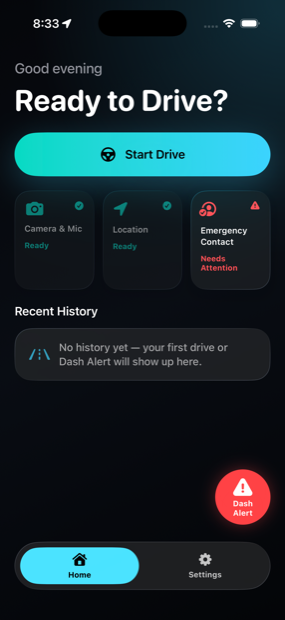
HomeCamera, location, and emergency contact status at a glance
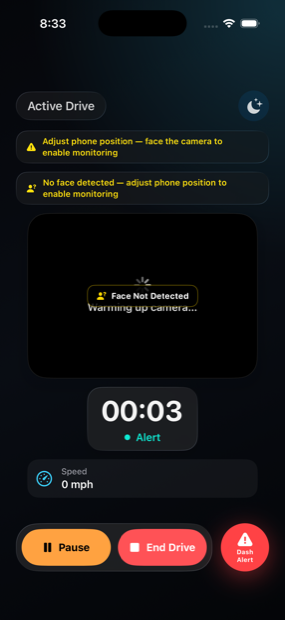
Active DriveLive alertness monitoring for the whole drive
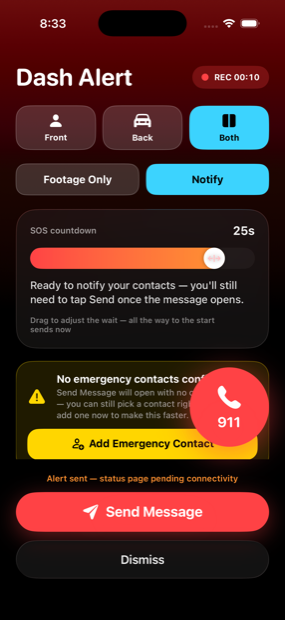
SOSCountdown, live location, and a one-tap emergency call
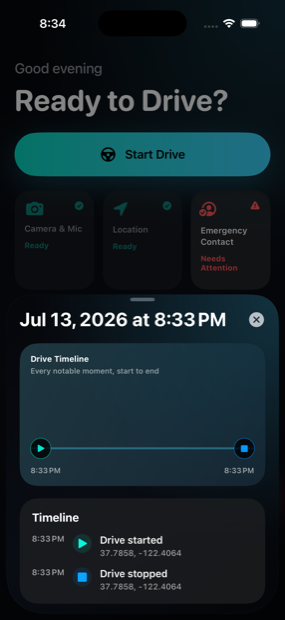
Trip HistoryEvery drive and Dash Alert, with a full timeline
What it does
Four systems, one goal: never drive unwatched.
Each one is built to work on its own — together, they cover the drive from the first mile to the moment you need help.
Alertness Monitoring
Reads eye closure and head position through the TrueDepth camera to catch drowsiness before it becomes a problem. In the dark, a warm screen glow automatically boosts visibility right when tracking needs it.
Dash Alert
One tap starts recording front and back footage of whatever's happening — a close call, a bad driver, an actual incident worth having on record.
SOS
Opens a message to your emergency contacts, pre-filled with your location and a live status link — plus a one-tap emergency call, always in reach.
On-Device Only
Every frame of alertness analysis stays on your phone, never uploaded anywhere. Dashcam footage only ever leaves your phone if you choose to share it during an alert.
How it works
Two ways to respond, your call every time.
Trigger a Dash Alert and choose how far it goes — nothing is sent to anyone unless you decide it should be.
Footage Only
Just keep the record.
Records front and back footage locally (and syncs to your own iCloud Drive on Pro). Nobody is contacted, nothing leaves your circle — useful the moment something's worth capturing but not worth an alarm.
SOS
Bring people in.
Opens a message to your emergency contacts with your live location and a status link they can check without needing the app themselves — plus a one-tap call to emergency services.
Built to know as little as possible.
WanderFree's whole design starts from the assumption that your face, your driving, and your location are yours. Alertness detection never leaves your phone, and even the emergency status page — the one exception that has to exist on a public link — is protected by nothing but a 128-bit random ID nobody could ever guess, auto-deleted once it's no longer needed.
0
Frames of your face ever leave your phone
100%
On-device alertness detection
128-bit
Random ID protecting every alert link
24h–7d
Auto-deleted after an alert resolves
Pricing
Try it free. Stay free, if you'd rather.
SOS and Dash Alert are always free, on every plan, forever — no trial, no limit, no upsell. The only thing a plan ever affects is how many monitored drives (live drowsiness tracking) you get.
Free
Try the full app, then keep using it lightly.
$0
5 monitored drives or 7 days to start, then 2 free monitored drives every month after that.
✓SOS emergency alerts — unlimited, always
✓Dash Alert dashcam recording — unlimited, always
✓Live drowsiness monitoring for your trial drives, then 2 more every month
✓Footage stays local on your device
✓Delete any trip or clip anytime, right from History
WanderFree Pro
Unlimited monitored drives, every trip.
$14.99/year
or $39.99 once, no subscription — pays for itself in about 3 years versus the annual plan.
✓Unlimited monitored drives, every drive, no monthly cap
✓Footage synced to your own iCloud Drive, browsable in Files — or turn sync off entirely, your choice
✓Custom retention — 24 hours up to Keep Forever
✓Pin any clip to keep it in iCloud Drive regardless of retention
✓Instant bulk-delete by date range, instead of selecting trips one by one
✓Optional auto-delete for footage on your phone too, off by default
✓Cancel the subscription anytime; the one-time purchase is yours forever
Local, on-device footage is never deleted automatically on either plan, and you can always delete any trip yourself from History — Pro just adds a faster bulk tool for it, plus your own iCloud Drive copy. Prices shown are indicative and set per region in the App Store.
Questions
Before you ask.
The short, honest answers — including the ones that aren't flattering.
Do I need to mount my phone?
Yes — on your windshield or dash, with the front camera facing you, within about 1–2 feet of your face. WanderFree can't track your alertness or record the road from your pocket or lying flat on a seat, and the infrared sensor's usable range is tuned for a closer, Face-ID-like distance, not a typical 3ft dashboard mount — eye-tracking accuracy drops noticeably farther out, especially at night.
Does it work at night or in low light?
Yes — on TrueDepth-equipped iPhones, alertness tracking uses the same infrared sensor as Face ID, which doesn't need visible light at all. That sensor's usable range is limited, though (tuned for Face ID's close-up distance, not a ~3ft dashboard mount), and eye-tracking accuracy drops noticeably farther out, especially at night — WanderFree will warn you and ask you to move the phone closer (within 1–2 feet) if it detects this. It also gently brightens your screen in the dark for visibility, but that doesn't extend the sensor's actual tracking range; there's no software fix for the range limit itself.
Does it work with glasses?
Ordinary prescription glasses are fine most of the time — tracking uses infrared, not your phone's regular camera, so clear lenses don't get in the way. Two things it does watch for: dark sunglasses, which can block that infrared reading on your eyes specifically (you'll see a message about it), and glare on your lenses scattering the infrared pattern — from oncoming headlights or streetlights at night, or even the app's own night screen glow reflecting back off your lenses at close range. WanderFree automatically dims that glow the moment it suspects glare, and shows a specific tip to tilt your head or the phone slightly. Even so, in some lighting — especially bright oncoming headlights at night — drowsiness may not be reliably detected while wearing prescription glasses. That's a real hardware/optics limit, not something software can fully fix in every case. If this happens often on your commute, try adjusting your mount angle slightly.
Does anything about my face or driving leave my phone?
No. Every frame of alertness analysis is processed on your device and never uploaded anywhere. Dashcam footage stays on your device; on WanderFree Pro it also syncs to your own iCloud Drive, not a WanderFree server — we don't operate one for that.
Does my dashcam footage show a timestamp or location?
Back camera footage does, once it's merged, shared, or synced to iCloud Drive — a date/time, speed, and GPS coordinate stamp that updates as the clip plays. Front camera footage never gets one — it exports through a different, quality-preserving path that isn't compatible with burning in a stamp. The raw clips you play back directly in the app's own History screen are never stamped either way.
What actually happens when I send an SOS alert?
WanderFree opens a message to your emergency contacts, pre-filled with your location and a live status link — but you (or whoever's holding the phone) still has to tap Send. iOS doesn't allow any app to transmit a text or place a call on its own; that's a platform rule, not a choice we made. Worth knowing before you rely on it.
What's the difference between Footage Only and SOS?
Footage Only just records — nothing leaves your circle, no one's contacted. SOS does that plus opens the pre-filled message described above. You choose per Dash Alert, and can switch between them mid-recording.
Who can see my live status link if I send one?
Only someone with the exact link — it's protected by a 128-bit random ID with no directory, search, or listing of any kind, so there's nothing to guess toward. It also deletes itself automatically: 24 hours after you mark yourself safe, or 7 days after triggering if you never do.
Do I need to pay to try it?
No — every feature is free to try, no payment method required upfront: your first 5 monitored drives or 7 days, whichever comes first. After that, SOS and Dash Alert stay free forever, and you still get 2 free monitored drives every month — or go unlimited with WanderFree Pro, an annual subscription or a one-time purchase, whichever you'd rather.
Will this drain my battery?
More than an idle phone, honestly — the camera and screen are both active for the length of your drive. It's built to back off when it can: your phone's own low-power/thermal state is respected, and features like screen brightening only kick in when they're actually needed, not constantly.
What permissions does it need?
Camera and Microphone — required, for alertness tracking and dashcam recording. Location — used throughout a monitored drive for distance/speed and to tag events, and for SOS so your message and status link can include where you are. iOS asks for each one the first time it's actually needed, not all at once. See the Privacy Policy for the full breakdown.